WhatsApp sales automation
Qualify new inquiries with smart questions, show product carousels, send Razorpay payment links, and auto-tag hot leads for your sales team — all without a human in the loop.
Sales bot details →
WhatsApp automation software
Autochatix gives you a visual flow builder to automate leads, support, payments, order tracking, booking, CRM sync, and more — all inside WhatsApp.
Visual flow builder
No code. No scripts. Drop nodes onto a canvas, connect them in any order, and publish. Your automation runs 24/7 from that moment.
Each node in the builder handles one specific task. Chain them in any order to create flows as simple or as complex as your business needs.
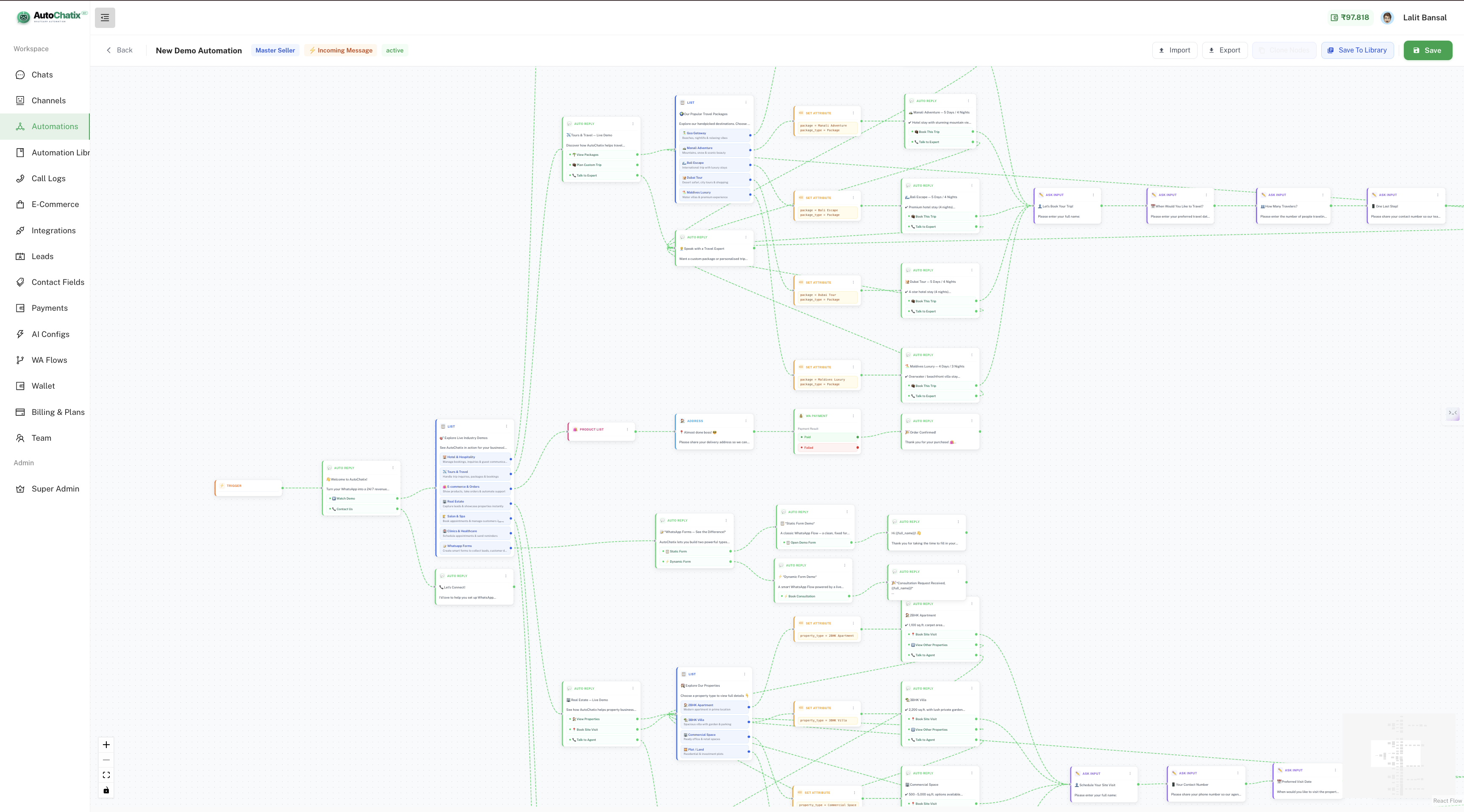
Real product screenshot
A live flow from a real Autochatix account — multiple node types, branching conditions, and integrations all wired together visually.
Each node is a step in your automation. Connect them in any order, add conditions, and publish — goes live instantly.
Automation node library
From simple reply-and-collect to complex multi-step branching with API calls and payments — pick the nodes you need.
Split your flow into multiple branches based on customer input, contact data, or API results. Route "VIP customers" one way, "new leads" another — automatically.
Make HTTP GET/POST calls to any external service mid-flow. Fetch order status, check availability, pull CRM data, or trigger webhooks — all without leaving the chat.
Let an LLM generate contextual replies for open-ended questions. Customers get intelligent, on-brand answers even for queries you didn't pre-script.
Run JavaScript-like expressions inside your flow. Calculate totals, format dates, manipulate strings, or derive values from previous inputs before the next step.
Generate a Razorpay payment link inside the conversation. Send it, wait for payment confirmation, then auto-continue the flow — all without leaving WhatsApp.
Tag contacts with custom attributes like "plan_type", "city", "interest", or "vip" based on their responses — and use those tags to filter future broadcasts.
Write collected data directly to a Google Sheet row in real time. Perfect for leads, bookings, orders, survey responses, and daily reports — no Zapier needed.
Display product catalogs, service menus, or feature carousels inside the chat. Customers tap to browse, select, and add to cart — no website redirect required.
Trigger a targeted broadcast to a filtered contact segment mid-flow. Use it for re-engagement, upsell nudges, or post-purchase follow-up sequences.
Automation workflows
Qualify new inquiries with smart questions, show product carousels, send Razorpay payment links, and auto-tag hot leads for your sales team — all without a human in the loop.
Sales bot details →Deflect repetitive tickets with FAQ flows, let customers check order status via API, route escalations to the right agent — and free your team for complex issues only.
Support features →Capture name, budget, and intent in a 3-message flow. Route high-value leads to a senior rep instantly. Low-value leads go into a nurture broadcast sequence.
See plans →Send Razorpay or Cashfree payment links mid-conversation, confirm payment automatically, and trigger the next step — booking confirmation, order dispatch, or invoice — without manual checking.
Talk to us →Connect Shiprocket or Borzo inside a flow. Customers type their order ID, the API node fetches live tracking, and the bot replies with status — zero agent effort.
Integrations →Collect date, time, and service preference with Ask Input nodes. Confirm the slot, send a Razorpay deposit link, and add the booking to Google Sheets — all automated.
Compare plans →Capture lead details, tag contacts with custom attributes, sync data to HubSpot or Zoho CRM via API, and keep your pipeline updated — without manual data entry.
CRM features →Send booking reminders, renewal nudges, fee reminders, and follow-up sequences on a schedule. Automated, personalized, and measurable — reduce no-shows by up to 40%.
Plan reminders →Built-in integrations
Every integration is a first-class node in the flow builder. No Zapier, no middleware — just drag, configure, and go.
Generate payment links inside conversations, auto-confirm payments, and continue the flow when the customer pays.
UPI, cards, netbanking — accept any payment method via Cashfree links sent directly inside your WhatsApp automation flow.
Write lead data, order details, or survey responses to a spreadsheet row in real time — no Zapier or manual export.
Create delivery orders, calculate distance, get rider assignment, and share tracking links — all triggered inside a WhatsApp flow.
Ship orders, fetch live tracking status, and send automated delivery updates to customers via WhatsApp — no manual tracking calls.
Pull order status, inventory, and product info from Shopify inside flows. Handle abandoned cart recovery and post-purchase follow-up.
Connect your WooCommerce store — automate order confirmations, status updates, refund flows, and back-in-stock alerts via WhatsApp.
Sync contacts, update deal stages, and log WhatsApp conversations to your CRM automatically — keep your pipeline current without manual entry.
Use the API Request node to connect any tool with an API — internal databases, ERPs, booking systems, or custom backends.
All integrations work inside automation flows — no extra tools, no manual setup. Available on Growth & Pro plans.
AI-powered automation
Most chatbots only handle what you pre-script. Autochatix lets you add an AI Response node anywhere in a flow to handle the questions you didn't think of.
Drop an AI node into any flow. It reads conversation context and generates a relevant, on-brand reply — for open-ended questions, objection handling, or product Q&A.
Run expressions on collected data — calculate invoice totals, check if a date is within range, format phone numbers, or build dynamic messages from multiple inputs.
Take a customer's location, check if it's within your delivery radius, and route the flow accordingly — show delivery options or a "not serviceable" message automatically.
Automation library
Don't start from scratch. Browse professionally built templates for every industry, import them to your account, and customize as needed.
Collect patient name, date, and symptoms — confirm the slot, send a reminder the day before, and log to Google Sheets automatically.
Ask budget, location preference, and property type — route hot leads to an agent, nurture others via broadcast, and sync all data to your CRM.
Let customers place orders, pay via Razorpay, get order confirmation, and track delivery via Shiprocket — all inside one WhatsApp conversation.
Capture student details, show course options with a carousel, collect fees via payment link, and send admission confirmation — zero manual steps.
Book a slot, suggest add-on services based on the appointment type, collect advance payment, and send a reminder 2 hours before.
Show the menu as a list or catalog, take the order, calculate total, send a Razorpay link, and dispatch a Borzo rider — fully automated.
FAQ
No. The visual flow builder is entirely drag-and-drop. You add nodes, connect them, configure inputs, and publish — no code required at any step.
Yes. Once a flow is published, it runs 24/7. It can collect details, route customers, take payments, and hand off to a live agent — without any human triggering it.
Yes. The Condition Router node lets you branch based on any customer input, contact attribute, or API response value. You can have unlimited branches with different paths.
Yes. Autochatix supports Razorpay and Cashfree payment link nodes. The flow auto-confirms when payment is received and proceeds to the next step — booking, dispatch, or confirmation.
Yes. Built-in integrations include Shiprocket, Borzo, HubSpot, Zoho CRM, Shopify, WooCommerce, and Google Sheets — all configurable as flow nodes without any code.
Basic bots handle keyword triggers and fixed replies. Autochatix supports conditional branching, API calls, payment collection, AI responses, contact tagging, broadcast triggers, and 20+ node types — making it a full workflow automation engine on WhatsApp.
Start with a free account. No credit card needed. Build your first flow in under 10 minutes.